prometheustsdbkubernetesmonitoringstorageopensource
Recovering Prometheus TSDB from "chunks_head" Corruption
23 Jun 2026 · 5 min read
The Symptom
A Prometheus pod entered CrashLoopBackOff. The logs showed a fatal error:
opening storage failed: /prometheus/chunks_head/000225: invalid magic number 0
This was not a simple OOM or config error, the TSDB (Time Series Database) on disk was corrupted. The pod restarted repeatedly, and metrics scraping for that cluster was offline for ~30 minutes before we intervened.
The Chase
We confirmed the PVC was intact. The corrupt file chunks_head/000225 had a size, but its header was all zeroes, the "magic number" that identifies a valid chunk file was missing. This usually happens when the Prometheus process is killed (SIGKILL) or the node loses power while the head chunk file is being written.
We paused the Prometheus operator to prevent it from recreating the pod, scaled the StatefulSet to 0, and mounted the PVC into a debug pod. We then tried promtool tsdb repair /prometheus. That is the first-line recovery tool, it attempts to fix block-level inconsistencies. However, it could not repair the head chunk corruption.
We removed 000225 manually. But then Prometheus failed again with:
found unsequential head chunk files /prometheus/chunks_head/000224 and /prometheus/chunks_head/000226
Deleting one file left a gap in the sequence. The TSDB requires contiguous numbering. We cleared the entire chunks_head/ directory. On the next startup, Prometheus replayed the Write-Ahead Log (WAL) and rebuilt the head chunk from scratch. All persistent blocks (the ULID-named <ULID>/ directories) were untouched.
The Root Cause
An ungraceful shutdown interrupted an in-flight write to the head chunk file. Prometheus TSDB has strict startup validation: it checks the magic number of each head chunk file and requires the sequence to be contiguous. It does not auto-skip or repair corrupt head chunks. Without manual intervention, the pod crash-loops indefinitely.
Underlying Technology: Prometheus TSDB and the WAL
Prometheus stores data in two main structures:
- Persistent blocks (the ULID-named
<ULID>/directories, sitting directly in the data directory) contain fully compacted data for past time ranges. These are immutable. - The head chunk (
chunks_head/) stores recent, in-memory data that has not yet been flushed to a block. It is memory-mapped to disk for recovery after restarts. - The Write-Ahead Log (WAL) (
wal/) records every sample write before it is acknowledged. If Prometheus crashes, the WAL is replayed to reconstruct the head.
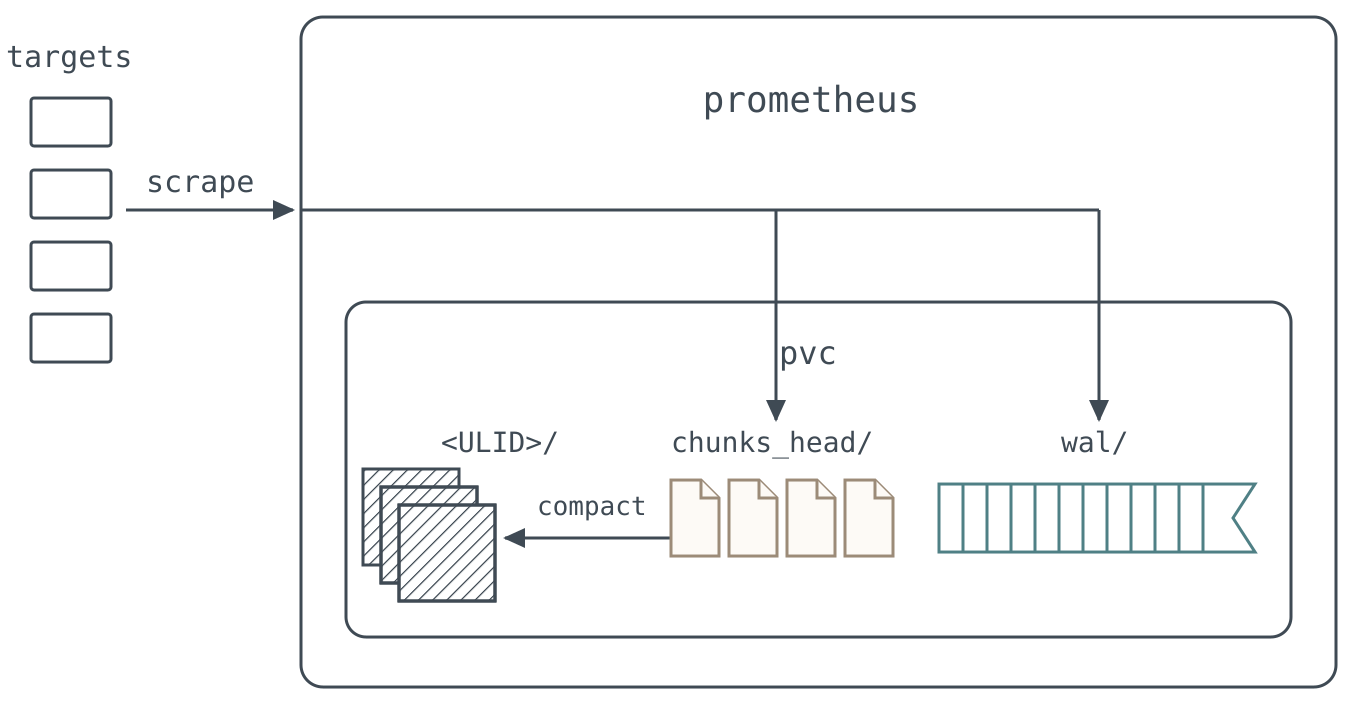
Every scraped sample lands in wal/ and chunks_head/ on the same volume. That duplication is what makes recovery possible: the <ULID>/ blocks are already immutable, and the WAL still holds whatever the head had not yet compacted.
The chunks_head/ directory contains numbered files (000001, 000002, …). Each file has a header with Prometheus's standard head chunk magic number (0x0130BC91) and a sequence number. When Prometheus starts, it reads the latest chunks_head/ file. If the magic number is invalid, it fatals, because it cannot trust the memory-mapped data.
Crucially, clearing chunks_head/ is a commonly used last-resort recovery technique. While promtool tsdb repair is the officially supported path and should always be attempted first, if it fails and the WAL is intact, clearing the head directory is non-destructive. The WAL contains every sample that was not yet flushed to a block. When Prometheus starts with an empty head, it replays the entire WAL and reconstructs the head chunk from scratch. Recent data (usually ~2 hours) is recovered fully.
The Fix and Lessons
We documented the recovery procedure: pause the Prometheus CR, scale to 0, mount the PVC in a debug pod, attempt promtool tsdb repair, and if that fails, clear chunks_head/ completely. We added an alert for Prometheus self CrashLoopBackOff in each monitoring-* namespace.
- Lesson 1: Always try
promtool tsdb repairfirst, it is the supported tool. - Lesson 2: If you must manually delete head chunks, delete the entire directory, not just the corrupt file, the sequence gap will cause another failure.
- Lesson 3: Consider enabling synchronous WAL writes and tuning
--storage.tsdb.wal-segment-sizeto reduce the window of unflushed data, though the ultimate safeguard is a good backup.
At Obmondo, we now have a runbook for TSDB corruption that includes the pause-CR + debug-pod pattern, and we recommend promtool tsdb repair as the first step. We also monitor prometheus_tsdb_head_chunks and alert if the head grows unusually large, which can be a precursor to corruption.
Who Was Watching Prometheus?
For thirty minutes, this cluster had no metrics and no alert about having no metrics.
KubeAid is our open-source Kubernetes platform: kube-prometheus, with Velero and snapshot-controller in the same catalogue, because Lesson 3 is right that a backup is what makes a corrupt TSDB boring. It won't stop a node dying mid-write, and you will still clear chunks_head/ by hand when it happens.
Or Hand the Debug Pod to Someone Else
If you'd rather not learn the TSDB on-disk format at 2 AM, Obmondo runs Kubernetes as a managed service with 24/7 SRE cover. This runbook is already written.
Same open-source stack. No lock-in.